SharePoint Registration IDs reference to build Custom Actions
nvalidType = -1
GenericList = 100
DocumentLibrary = 101
Survey = 102
Links = 103
Announcements = 104
Contacts = 105
Events = 106
Tasks = 107
DiscussionBoard = 108
PictureLibrary = 109
DataSources = 110
WebTemplateCatalog = 111
UserInformation = 112
WebPartCatalog = 113
ListTemplateCatalog = 114
XMLForm = 115
MasterPageCatalog = 116
NoCodeWorkflows = 117
WorkflowProcess = 118
WebPageLibrary = 119
CustomGrid = 120
DataConnectionLibrary = 130
WorkflowHistory = 140
GanttTasks = 150
Meetings = 200
Agenda = 201
MeetingUser = 202
Decision = 204
MeetingObjective = 207
TextBox = 210
ThingsToBring = 211
HomePageLibrary = 212
Posts = 301
Comments = 302
Categories = 303
Pages = 850
IssueTracking = 1100
AdminTasks = 1200
Reference blog http://sharepointsolution2010.blogspot.com/2011/09/registration-ids-sharepoint.html
Thanks to Nandini
Showing posts with label Document Library. Show all posts
Showing posts with label Document Library. Show all posts
Thursday, February 23, 2012

Sunday, October 3, 2010
SharePoint 2010 - Disable New Folder Button in a Document Library
How to disable 'New Folder' button in Document Libraries of a site in SharePoint 2010?
There might be a requirement from business to disable 'New Folder' button on a ribbon in all document libraries of a site.
You can achieve this task by going to each and every document library Advanced settings and
chose "No" for "Make 'New Folder' command available? "
Lets say, if you have 50 document libraries in a site and you want to disable New Folder option, how long its gonna take to make that change Or even if you do that manually, how will you make sure if any new Document Library created in a site will have New Folder option disabled?
In order to cater this requirement, the simple way is to create afeature, install it and then enable it on that site where you want to disable New Folder button in lthe document libraries.
Solution:
1) Create a Feature
There might be a requirement from business to disable 'New Folder' button on a ribbon in all document libraries of a site.
You can achieve this task by going to each and every document library Advanced settings and
chose "No" for "Make 'New Folder' command available? "
Lets say, if you have 50 document libraries in a site and you want to disable New Folder option, how long its gonna take to make that change Or even if you do that manually, how will you make sure if any new Document Library created in a site will have New Folder option disabled?
In order to cater this requirement, the simple way is to create afeature, install it and then enable it on that site where you want to disable New Folder button in lthe document libraries.
Solution:
1) Create a Feature
- Create a folder in your file system with a name of DisableNewFolderButton.
- Create two files in this folder, feature.xml and Manifest.xml
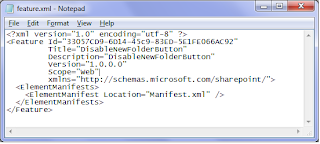
- Edit feature.xml file in notepad and add the following code

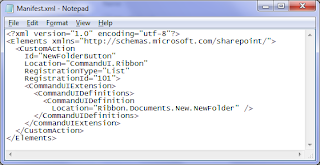
- Edit Manifest.xml file in notepad and add the following code.

DisableNewFolderButton Feature has been created.
2) Install a Feature
- We need to install this feature in SharePoint 2010.
- Copy the folder DisableNewFolderButton to SharePoint 14 hive feature folder. (C:\Program Files\Common Files\Microsoft Shared\Web Server Extensions\14\TEMPLATE\FEATURES\).
- Open stsadm tool as Administrator and exceute the following command. stsadm -o installfeature -name DisableNewFolderButton. Feature will be installed after running this command.
3) Activate a Feature
- Feature has been installed now we want to activate the feature on a site.
- Open stsadm tool as Administrator and exceute the following command. stsadm -o activatefeature -name DisableNewFolderButton -Url http://yoursiteurl/
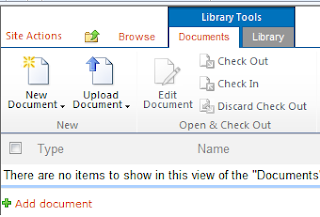
Now you go to the document library in the site, you will see New Folder is not visible as shown in the image.

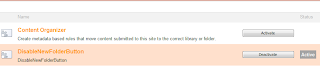
If you want to make New Folder visible for a particular site, go to Site Actions --> Site Settings --> Manage Site Features. You can see your feature Active as show in the image.

Deactive the feature, New Folder will be visible in the document libraries of that site.
Thanks,
JK
Subscribe to:
Posts (Atom)

